CX VERSION 1.84
ENHANCEMENTS
The following system-wide enhancements have been made to ConcentrixCX to improve the user experience. These require configuration & coordination with your ConcentrixCX implementation & deployment teams.
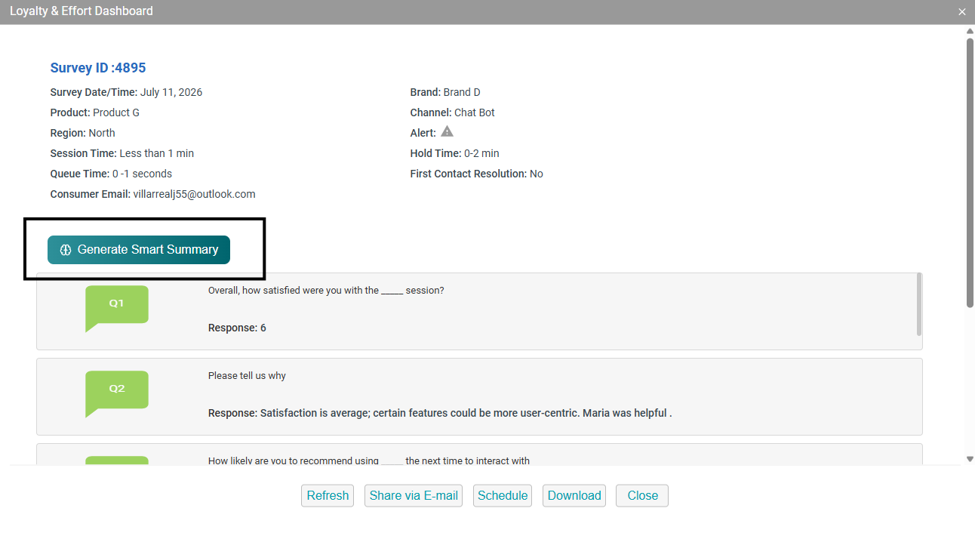
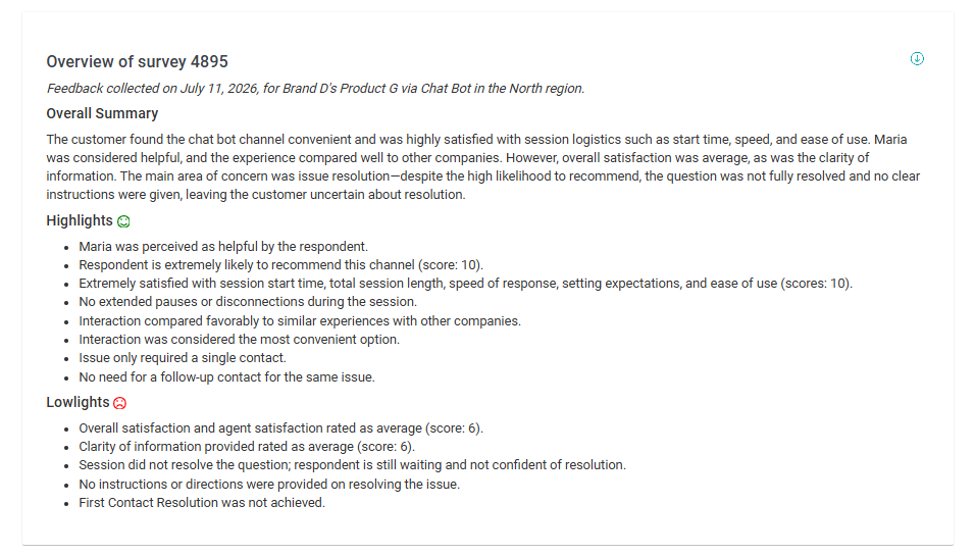
Smart Summaries – Available in Individual Survey Details: We are expanding the reach of Smart Summaries by bringing AI-powered insights directly into the Individual Survey Details (ISD) modal. Building on the success of Smart Summaries within the Comments View, users can now quickly generate concise, AI-driven summaries of individual surveys, helping users uncover key themes and insights in seconds rather than manually reviewing all responses to a given survey. By extending this capability into the ISD experience, ConcentrixCX makes it even easier to understand customer feedback and accelerate action directly from live customer feedback. This enhancement continues our commitment to embedding practical, user-focused AI throughout the ConcentrixCX experience
Response by Question Views – Pre-Filtering Configuration: We are extremely pleased to introduce Pre-Filtered Response by Question Views, a new enhancement designed to make it faster and easier for users to access the insights most relevant to their business needs. Organizations can now configure and share Responses by Question views with predefined filters already applied, allowing users to immediately focus on key customer segments, locations, products, channels, or other important dimensions without manually recreating filtering criteria. By standardizing commonly used analysis views, Pre-Filtered RBQ Views help improve consistency across teams, reduce time spent preparing reports, and accelerate access to actionable customer feedback. Whether supporting executive reporting, operational reviews, or targeted CX initiatives, this enhancement streamlines the path from data to insight and delivers a more efficient user experience throughout ConcentrixCX.
BUGS
The following bugs have been resolved. These do not require any configuration.
Dashboard Builder – Date Display: When building new widgets in dashboard builder, the dates appearing in the custom widget workflow were not displaying properly. This has been fixed, and all date filtering will display properly in the widget toolbox area.
Smart Summary – Date Wording in Summary: For projects with Smart Summaries configured combined with customized transaction date wording, the custom wording was not carrying through to the summary displayed on-screen. This has been resolved, and the proper date label will display when a smart summary is generated.
Data Export – Extra Double Quotes Appearing in CSV File Type: Various users reported extra double quote characters appearing when exporting a CSV file in the Data Export view, which shifted the fields and caused the layout of the file to be altered incorrectly. This has been addressed, and double quote characters will no longer improperly shift the orientation of the file.