CX VERSION 1.80
ENHANCEMENTS
The following system-wide enhancements have been made to ConcentrixCX to improve the user experience. These require configuration & coordination with your ConcentrixCX implementation & deployment teams.
- Smart Summary in Comments View: Concentrix CX is excited to announce Smart Summaries, an AI-generated overview of your customers’ comments, providing quick insights into both wins and issues.
- In Comments View, users may select ‘Generate Smart Summary’ to create a description of highlights and lowlights for the comments displayed in the view. Remember that this view only lists the first 1,000 comments, and it is this list that will be reviewed by the Smart Summaries process.
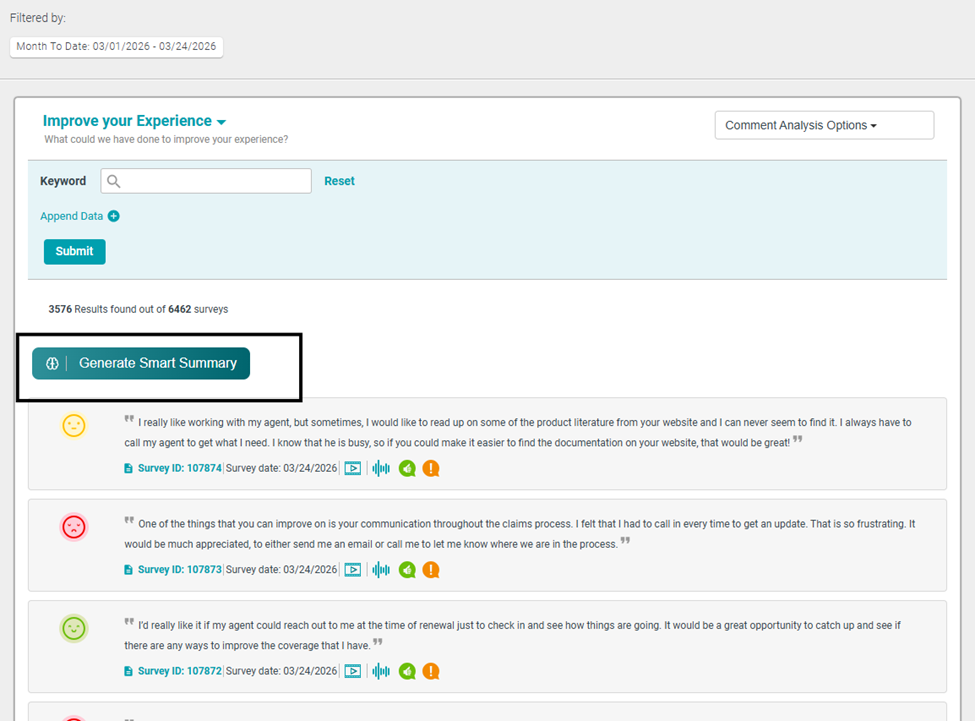
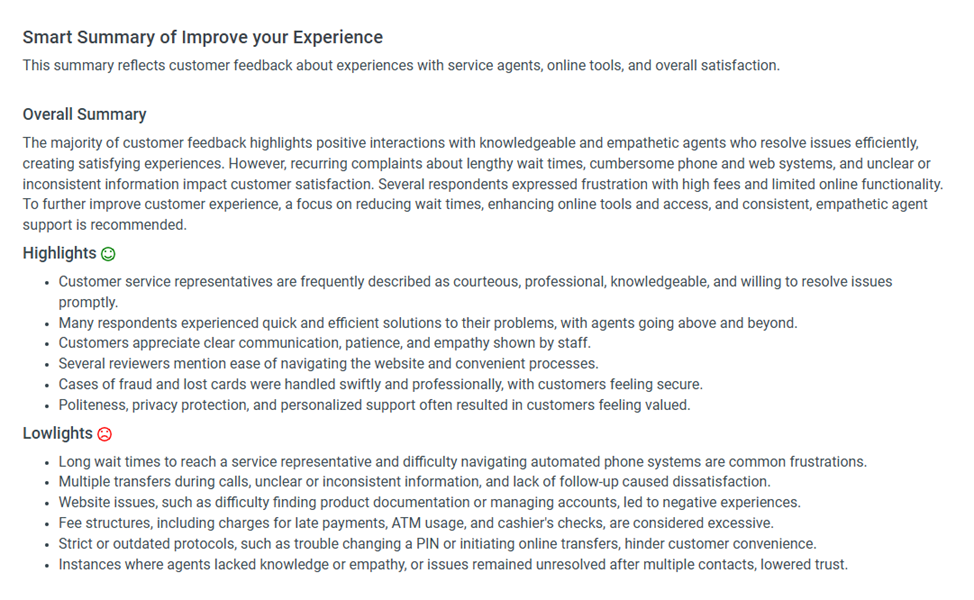
- The generated summary automates a concise summary of all the comments on the webpage. It will generate three perspectives to help users understand feedback:
- Overall summary: A high-level synopsis of the most prominent areas for improvement, areas of success, and applied filters if applicable.
- Highlights: Frequently noted positive responses that have the most impact on the sentiment score for customers.
- Lowlights: Lists the pain points, areas for improvement, and reoccurring problem that customers mention in comments.
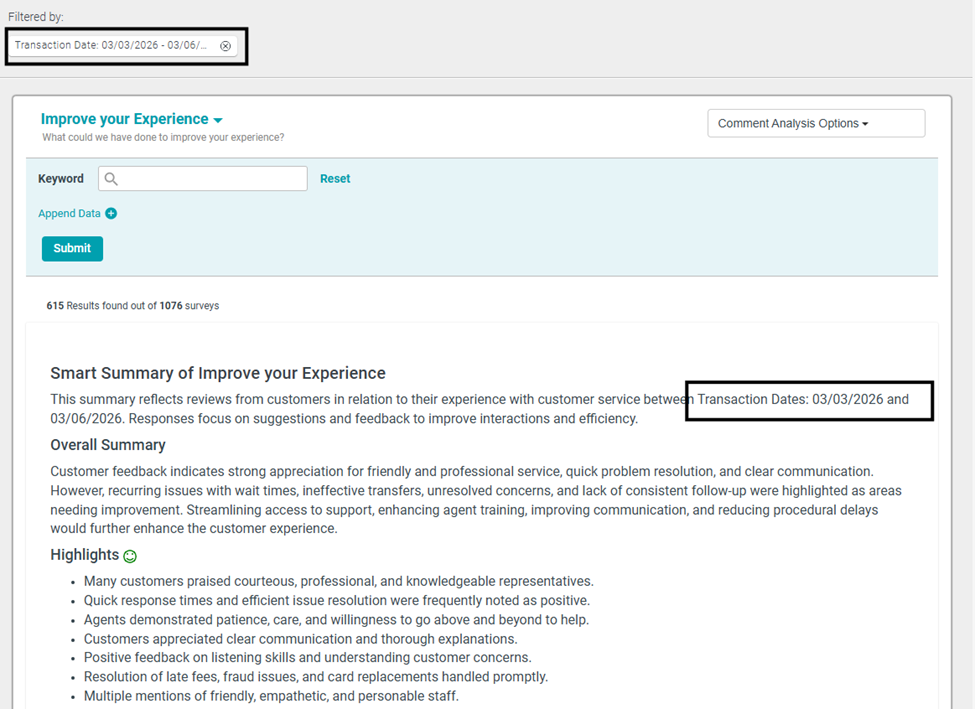
- Example Generated Summary:
- Key Benefits:
- Quickly see what themes are driving positive sentiment and which result in negative sentiment, saving users time.
- The summary will provide clear insight into actionable steps to help prioritize the most significant pain points or gaps.
- These standardized summaries will allow users to review consistent reporting over time, helping users compare comment results more easily and identify where business changes have impacted customer sentiment.
- Filtering:
- Date filters, if applied, will be outlined in the Smart Summary.
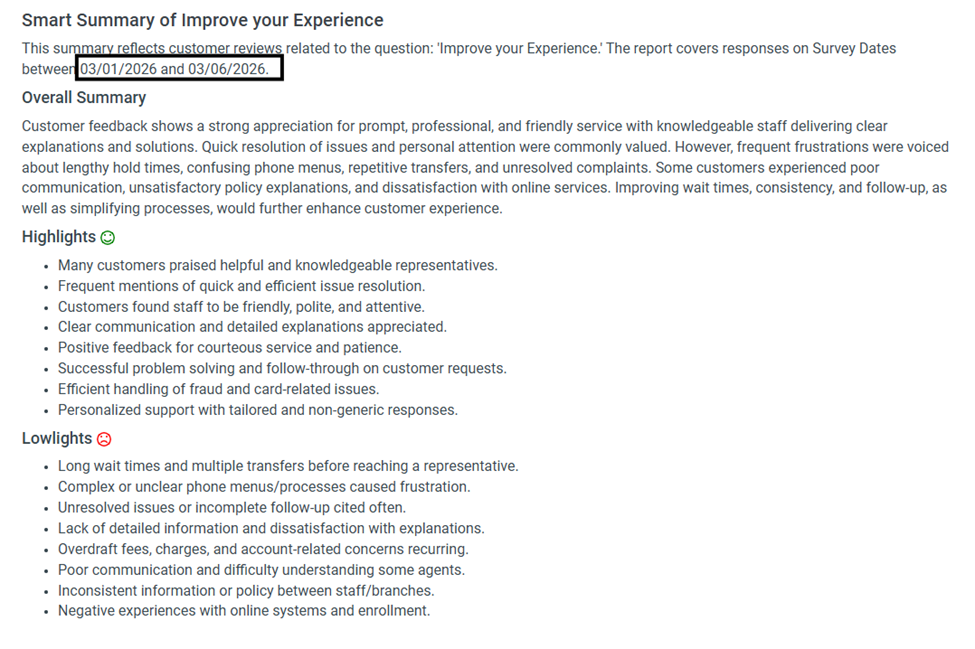
If a hierarchy or advanced filter is applied, this will be outlined in the Smart Summary for clarity on the applicable questions.
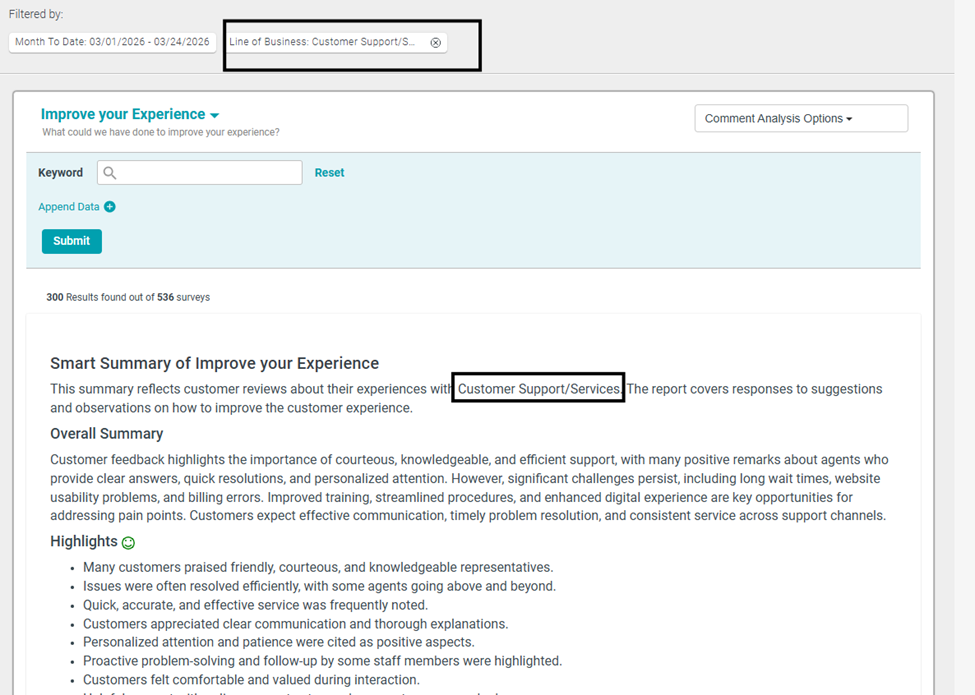
If the user specifies transaction date or survey date in the filter selection, then this will be outlined in the Smart Summary.
PLEASE NOTE: For anything listed in the Actions area of the comments view, the smart summary will not be included in these actions initially. Future releases and enhancements may include updates to these areas, but the actions taken below will not include the Smart Summary:
- Share via Email
- Schedule a report
- Download
- Set as Default
Please remember that this option needs to be configured on your program – contact your Client Success Manager or Implementation Consultant to discuss further.
The following system-wide enhancements have been made to ConcentrixCX to improve the user experience. These do not require any configuration.
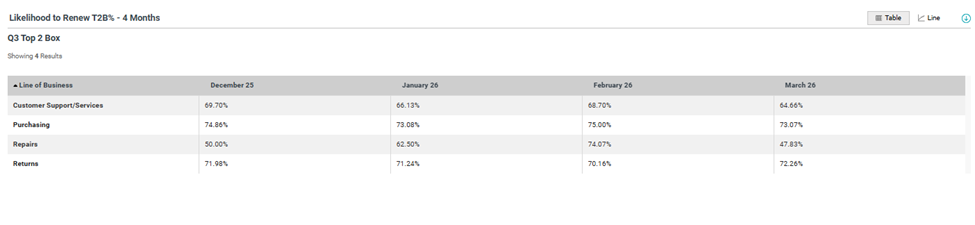
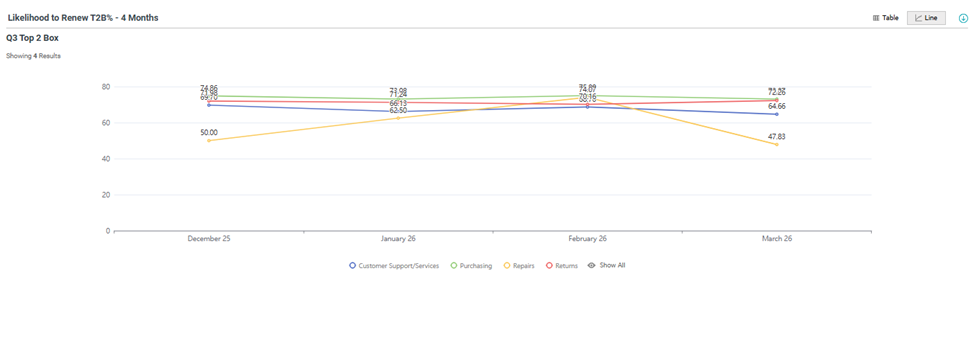
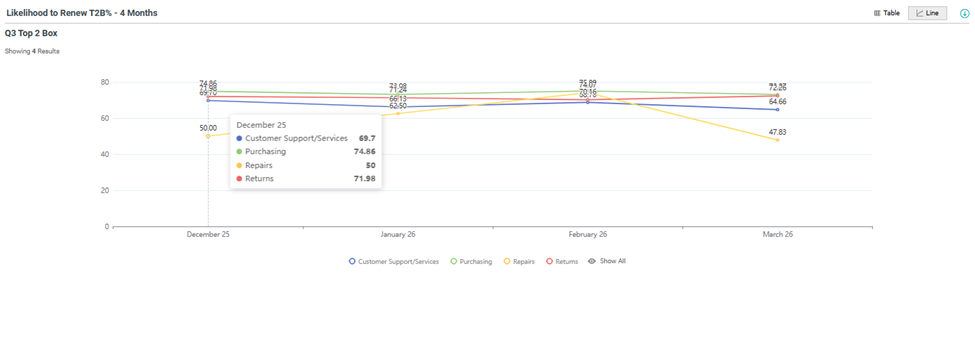
- Dashboard Builder - Calculation Distribution Over Time Data Grid- Line Chart: We are also excited to announce a new option is available within the Calculation Distribution Over Time Data Grid chart type! When selecting this widget, users can toggle to view the data in two formats: Table or Line chart.
- The toggle to display the data as table or line chart will be available with Table view as the default.
Table View:
 Line Chart View:
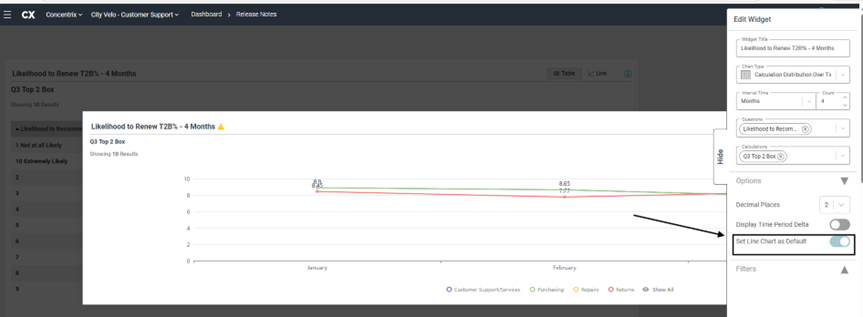
In addition, users can set up the Line Chart as the default view. In the Edit Widget panel, expand the Option section to view the toggle: “Set Line Chart as Default”.
In Line Chart view, users can hover over the line chart data point to view values for the selected time period.
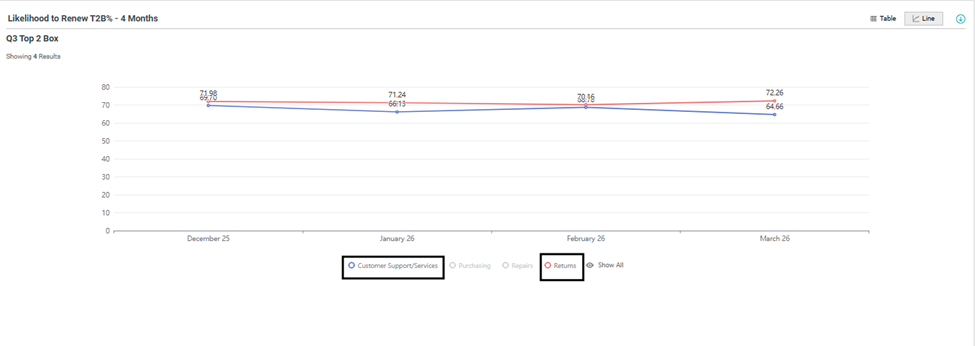
In Line Chart view, users can toggle the values to display on/off by clicking the item in the legend. For example, the Customer Support/Services & Returns LOBs are highlighted below.
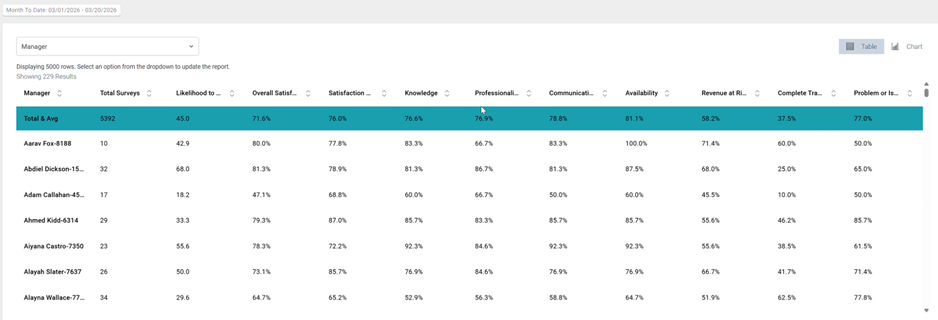
Metrics Report – Columns with Fixed Width: When users navigate to a Metrics view, the columns will now display in a fixed width, providing the ability for users to see all metrics on-screen immediately, versus having to horizontally scroll.
BUGS
The following bugs have been resolved. These do not require any configuration.
Hierarchy & Advanced Filters Removed after Idle Time: There were intermittent issues with hierarchy + advanced filters disappearing after a specific amount of idle time (3 – 5 minutes). This has been resolved, and regardless of how long a user may be idle, when they resume activity in ConcentrixCX, all filter choices will remain applied until a user clears them out.
Schedule Report not Rendering in Attachment: For the Dashboard Builder view, when users attempted to schedule a report, some widgets did not complete loading before the screenshot was captured. This has been resolved, and any report that is set up to be delivered via an automated schedule will now be rendered completely in the screenshot.